All of us watch lot of youtube videos online, if you want to save them , there is a simple way to do. You need not use external software to do the job follow these steps
- Install Klite Codec pack - software has package of all video codecs
-open the video in internet explorer - it should render completely.
-go to tools->options->view temporary internet files
-Sort files descending by size
-Copy the file that has the name something like "getvideo?..."
-paste the file to desktop and rename it to 1.flv
- Double click and open.

Sunday, March 8, 2009
You Tube video - access file from browser histrory

Tuesday, February 17, 2009
Create Locked Folder
* Copy the following codes (Marked in dark black colour):
cls
@ECHO OFF
title Folder Locker
if EXIST "Control Panel.{21EC2020-3AEA-1069-A2DD-08002B30309D}" goto UNLOCK
if NOT EXIST Locker goto MDLOCKER
:CONFIRM
echo Are you sure u want to Lock the folder(Y/N)
set/p "cho=>"
if %cho%==Y goto LOCK
if %cho%==y goto LOCK
if %cho%==n goto END
if %cho%==N goto END
echo Invalid choice.
goto CONFIRM
:LOCK
ren Locker "Control Panel.{21EC2020-3AEA-1069-A2DD-08002B30309D}"
attrib +h +s "Control Panel.{21EC2020-3AEA-1069-A2DD-08002B30309D}"
echo Folder locked
goto End
:UNLOCK
echo Enter password to Unlock folder
set/p "pass=>"
if NOT %pass%==type your password here goto FAIL
attrib -h -s "Control Panel.{21EC2020-3AEA-1069-A2DD-08002B30309D}"
ren "Control Panel.{21EC2020-3AEA-1069-A2DD-08002B30309D}" Locker
echo Folder Unlocked successfully
goto End
:FAIL
echo Invalid password
goto end
:MDLOCKER
md Locker
echo Locker created successfully
goto End
:End
* Now paste it in notepad.
* Change the "type your password here" with your password (Marked as bold in the above posted matter).
* Save it as batch file(with extension .bat).Any name will do.
* Now you see a batch file. Double click it to create a folder locker.
* A new folder named Locker would be formed at the same location.
* Now copy all the files you want to hide in the locker folder.
* Now double click the batch file to lock the folder namely Locker.
* If you want to unlock your files,double click the batch file again and you would be prompted for password.Enter the password and enjoy access to the folder.
cls
@ECHO OFF
title Folder Locker
if EXIST "Control Panel.{21EC2020-3AEA-1069-A2DD-08002B30309D}" goto UNLOCK
if NOT EXIST Locker goto MDLOCKER
:CONFIRM
echo Are you sure u want to Lock the folder(Y/N)
set/p "cho=>"
if %cho%==Y goto LOCK
if %cho%==y goto LOCK
if %cho%==n goto END
if %cho%==N goto END
echo Invalid choice.
goto CONFIRM
:LOCK
ren Locker "Control Panel.{21EC2020-3AEA-1069-A2DD-08002B30309D}"
attrib +h +s "Control Panel.{21EC2020-3AEA-1069-A2DD-08002B30309D}"
echo Folder locked
goto End
:UNLOCK
echo Enter password to Unlock folder
set/p "pass=>"
if NOT %pass%==type your password here goto FAIL
attrib -h -s "Control Panel.{21EC2020-3AEA-1069-A2DD-08002B30309D}"
ren "Control Panel.{21EC2020-3AEA-1069-A2DD-08002B30309D}" Locker
echo Folder Unlocked successfully
goto End
:FAIL
echo Invalid password
goto end
:MDLOCKER
md Locker
echo Locker created successfully
goto End
:End
* Now paste it in notepad.
* Change the "type your password here" with your password (Marked as bold in the above posted matter).
* Save it as batch file(with extension .bat).Any name will do.
* Now you see a batch file. Double click it to create a folder locker.
* A new folder named Locker would be formed at the same location.
* Now copy all the files you want to hide in the locker folder.
* Now double click the batch file to lock the folder namely Locker.
* If you want to unlock your files,double click the batch file again and you would be prompted for password.Enter the password and enjoy access to the folder.
Monday, February 16, 2009
Browse Internet Via SPICE/IDEA- Mobile for Free
After a lot of efforts I am able to connect my PC to internet via mobile phone,I thought sharing the same with you people.
You require
-GPRS enabled phone
-PC Suite to connect your phone.
-Connecting Cord.
-PC
Method to connect
-Activate free GPRS in your spice phone
-Connect to PC
-Go to control panel and setup a new dialup connection with the following details
- Dialup Number *99#
- Username : 91XXXXXXXXXX
- Password :spice (your free gprs password)
-IMP: Once you setup the connection, go to network properties->TCP/IP properties
-Change DNS servers to 61.1.96.69 and 61.1.96.71
-Restart the connection
Enjoy browsing for free... this method works with most of the mobile networks
Try it and let me know if any issues...
You require
-GPRS enabled phone
-PC Suite to connect your phone.
-Connecting Cord.
-PC
Method to connect
-Activate free GPRS in your spice phone
-Connect to PC
-Go to control panel and setup a new dialup connection with the following details
- Dialup Number *99#
- Username : 91XXXXXXXXXX
- Password :spice (your free gprs password)
-IMP: Once you setup the connection, go to network properties->TCP/IP properties
-Change DNS servers to 61.1.96.69 and 61.1.96.71
-Restart the connection
Enjoy browsing for free... this method works with most of the mobile networks
Try it and let me know if any issues...
Saturday, February 14, 2009
Importance of Port Forwarding in Torrent Clients
Many of us download stuffs like movies,music , games from torrents so it really matters how much speed you get, when you download huge file of size more than 1GB.
Most of the torrent clients use some random port numbers such as 55600. It is really important to allow the incoming connections on this port. When you open your torrent client, if a Yellow Triangle is displayed in connection status bar, it means the port has not been forwarded properly. and in these cases you get nearly 2 % of the actual download speed.
Following are steps forward the port properly.
- Make an Virtual Server entry in your router entry. It will be created automatically in some of the routers after you install the torrent client.
-Add an Exception to this port number in your Antivirus and Windows Firewall
-Restart your Torrent Client
Green icon gets displayed in the connection status bar. If your internet connection speed is 2mbps, you will get download speed of 170Kbps(depends on torrent factors) in your torrent client.
Most of the torrent clients use some random port numbers such as 55600. It is really important to allow the incoming connections on this port. When you open your torrent client, if a Yellow Triangle is displayed in connection status bar, it means the port has not been forwarded properly. and in these cases you get nearly 2 % of the actual download speed.
Following are steps forward the port properly.
- Make an Virtual Server entry in your router entry. It will be created automatically in some of the routers after you install the torrent client.
-Add an Exception to this port number in your Antivirus and Windows Firewall
-Restart your Torrent Client
Green icon gets displayed in the connection status bar. If your internet connection speed is 2mbps, you will get download speed of 170Kbps(depends on torrent factors) in your torrent client.
Tuesday, September 18, 2007
Replace The WELCOME Text
!!! WARNING !!!
Playing with system files using resource hacker can be Dangerous for your system and it can make your system not working.
So use it at your own risk!
In windows XP ,You can replace the welcome text that appears once you enter the correct password to logon to windowsPlaying with system files using resource hacker can be Dangerous for your system and it can make your system not working.
So use it at your own risk!
First,Download Resource hacker from here(512 KB)
http://www.mediafire.com/?51mjlt5zgx2
once you download that , open the main executable file.

Then Go to file->open browse the file logonui.exe in windows\system32 directory.
Once you are done with this then expand String Table->1->1033
In the right side you can see several texts replace the one with "welcome" string, with your desired string.(here Namaskaara). 
Then download replacer from here http://www.mediafire.com/?6e5mvtiap1w
replace the original system file by the modified one
Restart your PC
So you are done! your welcome screen will be like this.

Monday, July 2, 2007
Create Your First Visual Effect
You might have seen Movies in Hollywood especially those which contain
graphics, are shot using only blue screens in the background and then these
blue screens are replaced by backgrounds of warground,sea,nature, forests
etc.
You can easily create these kinds of visual effects in a small software
called Ulead Video Studio 10 download this from www.ulead.com
For practice example lets take the video which is shot in the green
background.
Install and open UVS 10(Ulead Video Studio)and click on this to create a
new overlay track.

Then it will look like this

Now just drag and drop the video that is shot in blue/green background,and
also place the desired background image/video as shown

Now the time to make a Real trick with UVS10 just Click on the video
thumbnail ,click on chroma key -> then set the color to green


Just look at this Beautiful effect ..
Video before ..

And now it is...

Render the final Video in UVS and enjoy.
graphics, are shot using only blue screens in the background and then these
blue screens are replaced by backgrounds of warground,sea,nature, forests
etc.
You can easily create these kinds of visual effects in a small software
called Ulead Video Studio 10 download this from www.ulead.com
For practice example lets take the video which is shot in the green
background.
Install and open UVS 10(Ulead Video Studio)and click on this to create a
new overlay track.

Then it will look like this

Now just drag and drop the video that is shot in blue/green background,and
also place the desired background image/video as shown

Now the time to make a Real trick with UVS10 just Click on the video
thumbnail ,click on chroma key -> then set the color to green


Just look at this Beautiful effect ..
Video before ..

And now it is...

Render the final Video in UVS and enjoy.
Thursday, June 28, 2007
Outlook 2007 Professional
Hello; 
 Compose message … it has got built in spell and grammar checking tools.
 Observe the shadow of these images are also created in outlook!
Just go through these screenshots of outlook 2007 .It is too good .
Inbox is configured well, you can categorize your mail in different formats.
And contact management is pretty good you can make distribution lists of your contacts and send selected mails to them.
Compose message … it has got built in spell and grammar checking tools.Observe the shadow of these images are also created in outlook! Wednesday, February 7, 2007
Configure opera as your mail client.
First download the latest version of opera and here I will tell how you can configure opera as your GMAIL client.
-First you login to your GMAIL account and go to
settings->forwarding and pop->enable pop3
open opera go to tools-> mail and chat account as shown
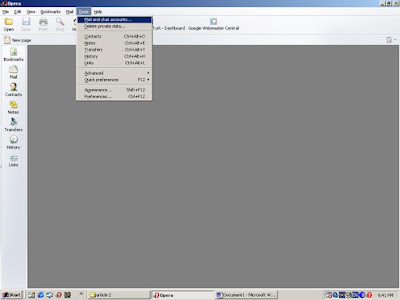
and then click on new and select the first option (see below)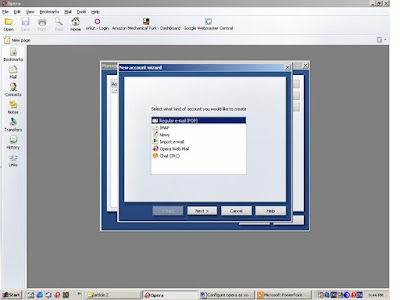
-First you login to your GMAIL account and go to
settings->forwarding and pop->enable pop3
open opera go to tools-> mail and chat account as shown
and then click on new and select the first option (see below)
and in real name field you give the name to be displayed in your mails. Click on next
Give your login name and passwords
Set incoming server as pop.gmail.com
And outgoing server as smtp.gmail.com
Click on finish!
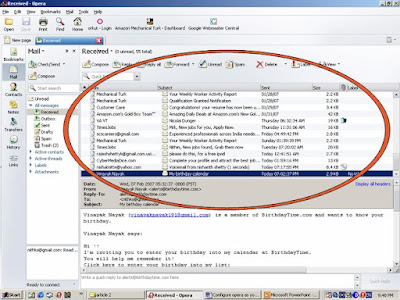
Now you can get all GMAILS in your opera inbox (encircled region)
Advantages.
-You need not open web page of GMAIL and login there
-You can save messages in your HDD
-You can create groups of contacts and send messages to a particular group
Monday, February 5, 2007
Simple Video Editing
Here I will explain how you can cut and join your videos add effects to it and finally producing the mpeg file or CD/DVD of that.
I prefer using ULEAD VIDEO STUDIO (any version) for these purposes.
Cropping videos
In this picture you can see the timelines of base and overlay videos, I will explain these in the figure.
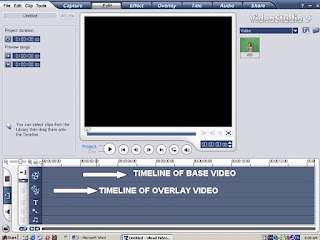
Once you identified these you can insert the videos from a VCD (.dat format) or directly a mpeg file. By right clicking on base video timeline strip->insert video
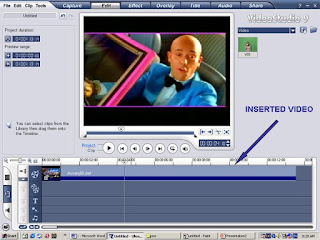
Once you insert the video it will spread along the timeline as shown below
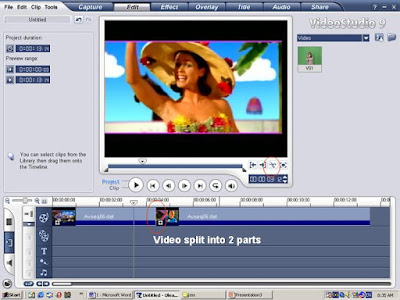
You can place your cursor on the vertical line and click-drag along video to get the desired frame. When the desired point is there you just click on scissor mark shown in red circle. And ntice that video is now spitted into two parts .
I prefer using ULEAD VIDEO STUDIO (any version) for these purposes.
Cropping videos
In this picture you can see the timelines of base and overlay videos, I will explain these in the figure.

Once you identified these you can insert the videos from a VCD (.dat format) or directly a mpeg file. By right clicking on base video timeline strip->insert video
Once you insert the video it will spread along the timeline as shown below
You can place your cursor on the vertical line and click-drag along video to get the desired frame. When the desired point is there you just click on scissor mark shown in red circle. And ntice that video is now spitted into two parts .
Here you can delete any part of the video by clicking on that and pressing DELETE
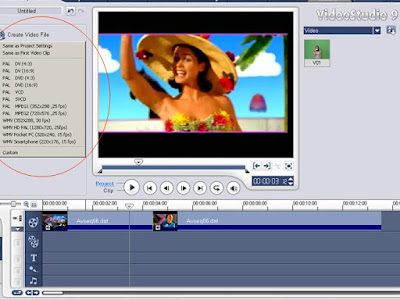
To recreate cropped video, go to share (see below)
 and click on Create video file then choose the appropriate format from the dropdown list.
MORE POSTS LATER......
Subscribe to:
Posts (Atom)


